GL.iNet GL-MT3000 + Tailscale: Cross‑Subnet Access Fix
GL.iNet GL-MT3000 + Tailscale: Cross‑Subnet Access Fix

Problem

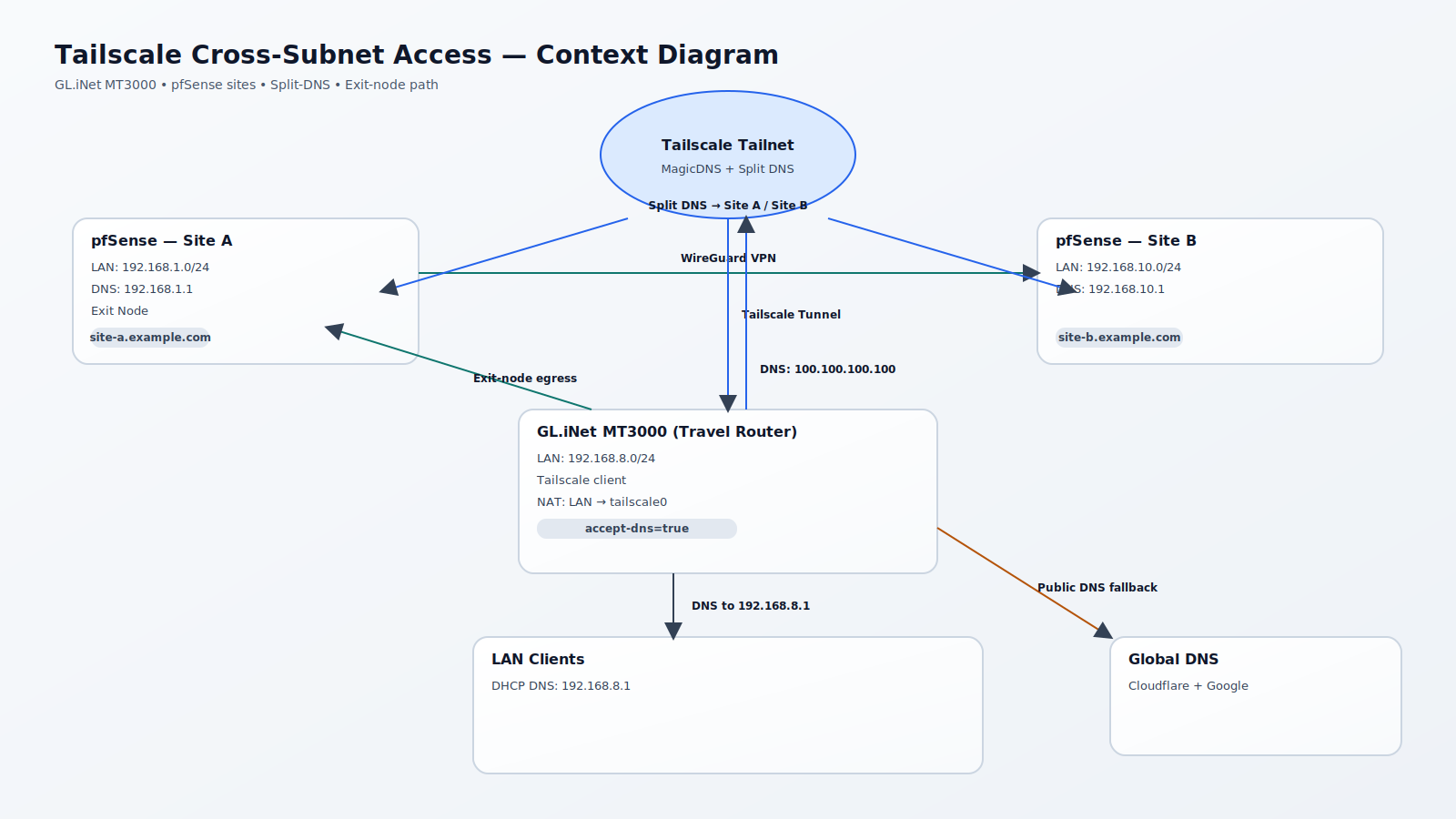
LAN clients behind a GL.iNet GL-MT3000 could not access machines on other subnets within the same Tailscale environment. The fix required enabling split‑DNS in Tailscale, forcing the GL.iNet client to accept DNS, and NATing LAN traffic to tailscale0.

Symptoms

  • LAN clients behind the GL-MT3000 could not reach hosts in other private subnets over Tailscale.
  • Split‑DNS names such as pfsense.site-a.example.com did not resolve for LAN clients.

Fix Steps

1) Tailscale Admin

  • Enable MagicDNS.
  • Create split DNS entries:
  • site-b.example.com192.168.10.1
  • site-a.example.com192.168.1.1
  • Set Global nameservers to Cloudflare Public DNS and Google Public DNS.
  • Enable Override DNS servers.

2) GL.iNet GL-MT3000 (accept DNS from Tailscale)

Edit /usr/bin/gl_tailscale and apply this diff (line ~226):

- timeout 10 /usr/sbin/tailscale up --reset --accept-routes $param --timeout 3s --accept-dns=false > /dev/null
+ timeout 10 /usr/sbin/tailscale up --reset --accept-routes $param --timeout 3s --accept-dns=true > /dev/null

Upgrade note: This file may be overwritten by firmware upgrades. Add it to LuCI backups (System → Backup / Flash Firmware → Configuration):

/usr/bin/gl_tailscale

3) GL.iNet GL-MT3000 (NAT LAN → tailscale0)

Add the following to /etc/firewall.user and restart the firewall:

# NAT traffic going out to Tailscale sourced from the LAN subnet.
iptables -t nat -A POSTROUTING -s 192.168.8.0/24 -o tailscale0 -j MASQUERADE

/etc/init.d/firewall restart

Verification

  • nslookup pfsense.site-a.example.com 192.168.8.1
  • Ping or connect to a host in 192.168.1.0/24 and 192.168.10.0/24 from a LAN client.

Final State (Expected)

  • GL-MT3000 LAN clients can access hosts in other Tailscale‑reachable subnets.
  • Split DNS resolves *.site-a.example.com and *.site-b.example.com correctly.
  • Public DNS resolves everything else.

Install Proxmox for PfSense

System Specifications

  • Mini PC with at least ETH 3 ports CWWK Mini PC
  • 16GB RAM
  • 256GB NVMe SSD
  • Single-node Proxmox setup (no clustering)
  • No dedicated GPU or RAID

Installation

  • Step 1 – Download Proxmox VE ISO
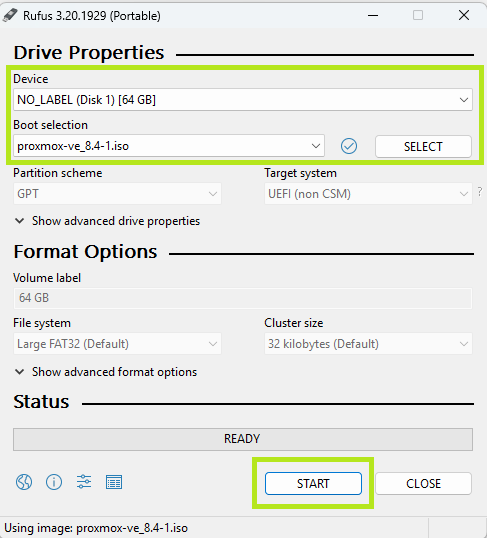
  • Step 2 – Download Rufus
  • Step 3 – Install ISO onto empty USB stick


  • Step 4 – Start the Proxmox installer (UEFI mode)
  • Step 5 – On the “Target Hard Disk” screen:
    • Select your drive
    • Then click the button labeled “Options” at the bottom-right corner of the screen
  • Step 6 – In the Options Window:
    • Filesystem: Choose ext4
    • hdsize: Default is fine unless you want to shrink it
    • swapsize: Set this to 0 to disable disk swap (note: we will be enabling zram swap later).
    • maxroot: Leave blank unless you want to cap /
    • minfree: Optional (for snapshots or alignment)
    • maxvz: Leave blank (it will use remaining space)
  • Step 7 – On the Management Network Configuration screen:
    • Management Interface: Choose the first port being used for your Linux Bridge (LAN)
    • Hostname (FQDN): Example pve.home.arpa
    • IP Address (CIDR): IP Address
    • Gateway: Gateway IP address
    • DNS Server: Usually the same as the Gateway

Enable Trim/Discard

Login to the PVE shell and enable Trim/discard on the root filesystem:

lvextend -l +100%FREE /dev/pve/root
resize2fs /dev/pve/root
nano /etc/fstab

Update root line to:

/dev/pve/root / ext4 discard,errors=remount-ro 0 1
systemctl daemon-reload
mount -o remount /
nano /etc/pve/storage.cfg
lvmthin: local-lvm
    thinpool data
    vgname pve
    content rootdir,images
    discard 1
systemctl enable fstrim.timer
systemctl restart fstrim.timer

Set up zram swap:

apt update
apt install zram-tools
nano /etc/default/zramswap

Set:

ALGO=lz4
PERCENT=13
systemctl enable zramswap
systemctl restart zramswap
swapon --show
NAME       TYPE      SIZE USED PRIO
/dev/zram0 partition   2G   0B  100

Post Install Script

bash -c "$(curl -fsSL https://raw.githubusercontent.com/community-scripts/ProxmoxVE/main/tools/pve/post-pve-install.sh)"